GTM Version Summaries: A Practical Guide
Discover Version Name and Version Description best practice
Building marketing dashboards in Data Studio often becomes a tedious time sink.
You end up spending hours tweaking box alignments, matching custom colour palettes, or answering the same client questions about metric definitions.
Using smart shortcuts, structural controls, and embedded assets can dramatically streamline your dashboard creation process.
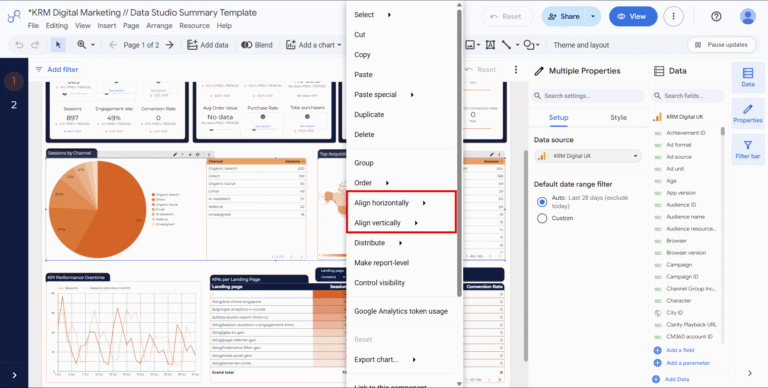
Re-building charts from scratch is inefficient. These shortcuts let you standardise design elements across your report in seconds:
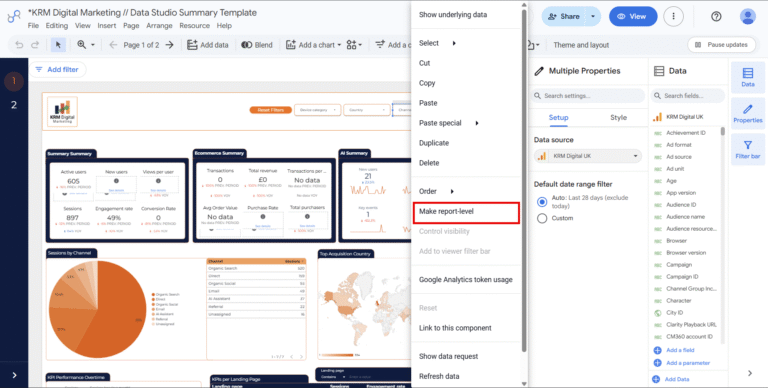
Applying identical settings across multi-page reports wastes time. Global structural controls solve this issue cleanly:
Cluttered dashboards confuse stakeholders, but removing detail leaves them seeking clarification.
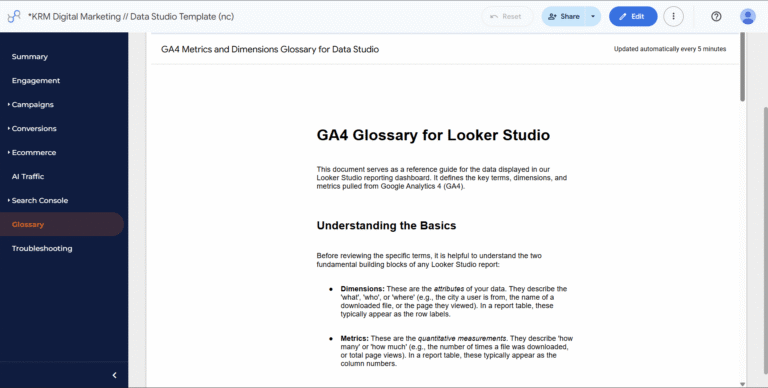
Embedded documentation balances both needs:
So there you have it – some quick wins and new approaches that might help build those Data Studio dashboards quicker.
How do I copy only formatting styles in Data Studio?
Select the styled chart, press Ctrl + Alt + C (or Cmd + Option + C on Mac), select your target chart, and press Ctrl + Alt + V (or Cmd + Option + V).
What is the benefit of making an element report-level?
Setting an element to report-level makes it appear in the exact same position across every page, saving setup time on global controls like date pickers and headers.
Can you embed external documentation directly inside Data Studio?
Yes. Data Studio allows you to embed external content using URL embeds, including YouTube videos, Google Docs glossaries, and user guides.

Discover Version Name and Version Description best practice
Learn how to declutter, condense, and codify your setup for streamlined maintenance and flawless tracking accuracy.

Learn actionable Google Analytics 4 strategies to spot organic traffic anomalies, fix content decay, and prove SEO value to stakeholders.

Learn how to build, publish, and share custom dashboards directly inside Google Analytics 4 reports without leaving the platform.

Author
Hello, I'm Kyle Rushton McGregor!
I’m an experienced GA4 Specialist with a demonstrated history of working with Google Tag Manager and Looker Studio. I’m an international speaker who has trained 1000s of people on all things analytics.