

Page Referrer in GA4
Find out exactly where your website traffic is coming from with the page referrer dimension in GA4
You spend hours building highly specific audiences in Google Analytics 4.
You know exactly who your high-value users are.
But how do you easily track the exact moment a user joins one of those groups?
That is where audience triggers come into play.
They let you fire a specific event the second a user matches your audience definition.
You can then mark these as key events. Sounds brilliant, right?
It is, but there are some significant quirks you need to understand before you start building them out.
Audience triggers fire an event when a user meets your specific audience criteria.
You are limited to 20 audience trigger events per GA4 property.
Triggers copy metadata directly from the original events.
A major warning: they can increase your unassigned sessions.
When a user matches your audience conditions, GA4 automatically fires a new event.
In my own campaigns, I have found this incredibly useful when tracking complex actions.
For instance, you might want to track a user who lands on a specific landing page and then completes a core conversion.
Or perhaps you want an event to fire when someone has read five different case studies. Or visited and read a blog and then completed a key event.
This transferred data includes details like the
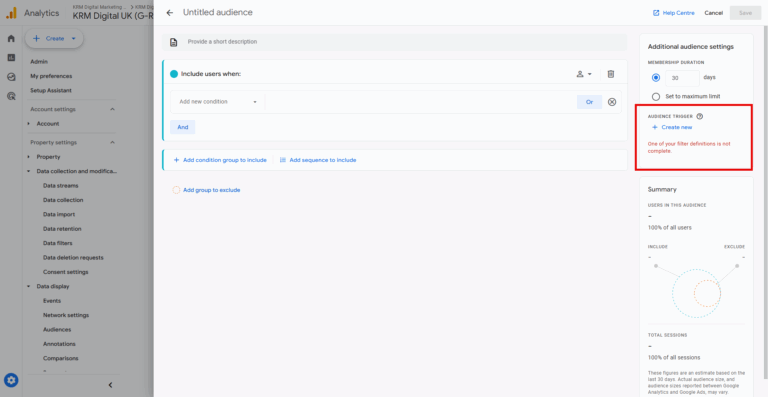
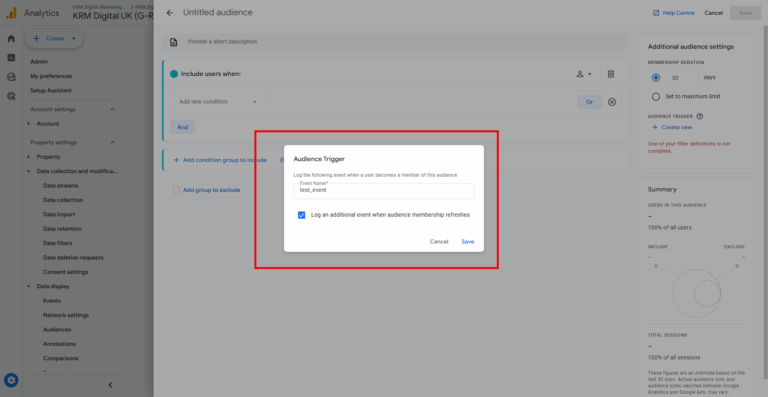
Setting these up is straightforward.
If you ever need to amend or remove a trigger, simply click the pencil icon next to the event name to edit, or the bin symbol to delete it completely.
Let us look at a practical example.
Say you run marketing for a travel company.
You could build a trigger for a “new high-value customer”.
The conditions might dictate that they book a hotel for greater than 13 days and have booked frequently before.
The moment those conditions are met, your “new_frequent_long_term” event fires.
We really must talk about the caveat.
These events can increase the number of unassigned sessions where the session source or medium equals not set.
It is a real stickler. Because of how these are processed, relying heavily on them can skew your acquisition reporting. You will have to think carefully before you decide to roll them out across your entire tracking setup. I always evaluate if a standard event will do the job first before relying on an audience trigger.
Just as a piece of information – there is a difference between audience triggers and custom events.
They are calculated quite differently.
A standard event is calculated client-side before the data ever reaches Google Analytics.
An audience trigger, however, is created during the data processing phase when users become part of an audience or refresh their membership.
Because audience triggers are calculated during processing, you cannot use them as the basis for creating new custom events. Keep them strictly for tracking audience entry and marking key events.
Audience triggers are a reasonably powerful feature for identifying high-value behaviours and additional informaiton, provided you respect their limitations.
Use them strategically for your most important user segments, keep an eye on your unassigned traffic, and you will gain valuable insights into your funnel.
How many audience triggers can I make in GA4?
You can create a maximum of 20 audience triggers per Google Analytics 4 property.
What happens to metadata when an audience trigger fires?
The new event inherits metadata like user ID and session ID from the event that completed the audience condition.
Why do my unassigned sessions increase with audience triggers?
Audience triggers are evaluated during data processing and can inadvertently start new sessions. These sessions often lack source or medium data, resulting in “not set” values.

Find out exactly where your website traffic is coming from with the page referrer dimension in GA4

Learn how to set up Google Tag Manager constants to streamline your GA4 and pixel tracking setups.

Learn how to set up Google Tag Manager constants to streamline your GA4 and pixel tracking setups.

Learn how to set up Google Tag Manager constants to streamline your GA4 and pixel tracking setups.

Author
Hello, I'm Kyle Rushton McGregor!
I’m an experienced GA4 Specialist with a demonstrated history of working with Google Tag Manager and Looker Studio. I’m an international speaker who has trained 1000s of people on all things analytics.