

Using one GTM container for multiple sites

June 3, 2026

Managing tracking codes for a portfolio of websites can quickly become a headache.

Logging in and out of different accounts to update a single Meta Pixel is tedious.

If you oversee multiple domains, you might be wondering if you can consolidate everything into a single Google Tag Manager container.

You absolutely can.

Table of Contents

Key Takeaways

  • Consolidating your GTM setup saves significant time if your websites share a similar structure.
  • Lookup tables ensure the correct tracking scripts fire on the correct domains automatically.
  • Strict naming conventions are essential to prevent tags from accidentally firing on the wrong website.

Consolidating your tags

You might think consolidating tracking across various sites is potentially quite challenging.

It is actually relatively easy to set up.

There are absolutely no technical limitations preventing you from doing this.

The main challenge you will face is simply managing that container and ensuring your documentation and audits are entirely up to date.

If you can keep your workspace organised, you can make this strategy work.

Why Consolidate Your Tags?

If you have websites that are very similar in structure, there are massive benefits to bringing everything under one roof.

The most obvious benefit is time.

If you want to update a consent management script across three different websites, you do not have to open three separate containers. You make the change once, and you ensure it occurs across all the different domains simultaneously.

You can manage your consent platforms, GA4 scripts, and custom events all in one place.

Additionally, all your tag versions and history remain neatly compiled together.

How to manage it all?

You might be asking how Google Tag Manager knows which tag to fire on which website.

The answer lies in lookup tables and regex tables.

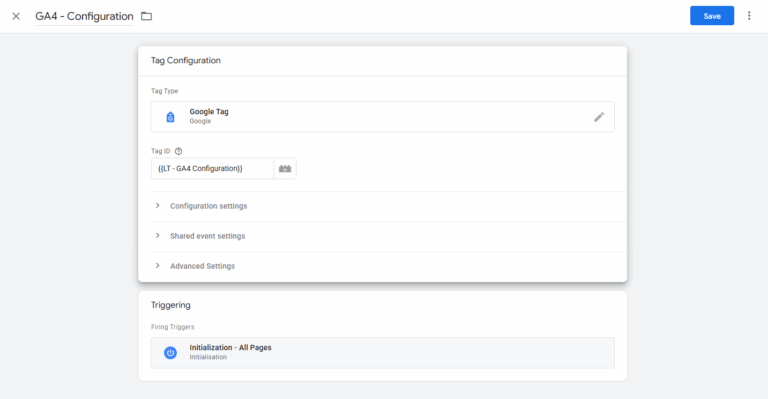
For example, you can set up a lookup table for your GA4 script. So instead of adding a single Tag ID to you tag configuration, you add a lookup table.

Lookup table GA4

You instruct GTM: if the user is on Domain A, fire this specific GA4 tag.

If they are on Domain B, fire a different GA4 tag.

You ensure that no matter the domain you are working with, you are sending the relevant information to the correct property.

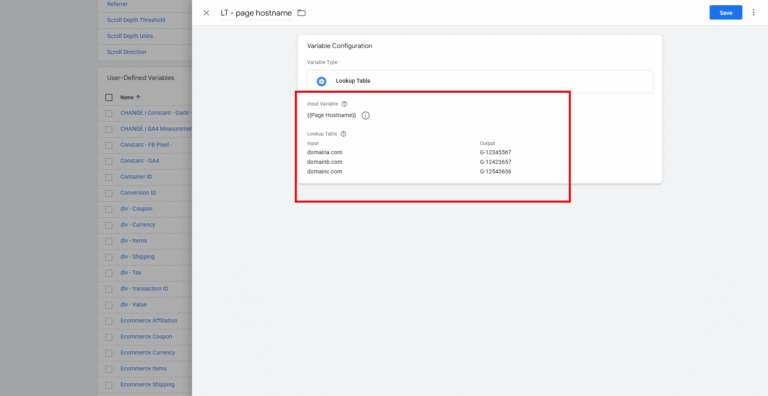
The exact same logic applies to your Facebook Pixel or Consent Management Platform (CMP). So you can create a look up table with different configurations based on your hostnames. 

So say if you have 3 different domains, using this approach via one container reduces the tags used from 9 (3 separate tags for GA4, Facebook and CMP configurations) to just 3.

Look up table page hostname

Client example

This has worked brilliantly for me in the past with hospitality clients – where their hotels are all on the same booking engine.

I just need one GTM container, using a lookup table. And all events etc are managed the same because it’s the same dataLayer within the booking engine.

One GTM container, rather than multiple.

What About the Caveats?

This approach is not a universal fix.

Where a single container may not work so well is if your sites are completely different e.g. one is a blog site, one is a SaaS and one is an ecommerce. 

Moreover, if they are all ecommerce, but perhaps on different ecommerce platforms e.g. Shopify and WooCommerce, that’s where it might be more challenging.

If the tracking requirements differ wildly, you will want to stick to separate GTM containers.

There is also the human error factor.

You could accidentally fire a tag on the wrong site if your triggers are not specific enough. You need to ensure you have strict naming conventions to reduce any potential confusion.

Moving Forward

Managing a single container for multiple domains saves time and keeps your tracking history centralised.

It requires strict naming conventions and a solid grasp of lookup tables, but the efficiency gains are well worth the initial setup.

Frequently Asked Questions

Can I use one GTM container for subdomains?

Yes, using one container across a main domain and its subdomains is highly recommended and makes cross-domain tracking much smoother.

Will a single container slow down my websites?
No. As long as you configure your triggers correctly so tags only fire when necessary, the impact on page speed is negligible. Multiple containers on the otherhand…..

How do I test tags safely in a shared container?
You should rely heavily on GTM’s Preview mode and ensure you specify the exact URL you want to test. And don’t forget to annotate when changes are made.

Kyle

Author

Hello, I'm Kyle Rushton McGregor!

I’m an experienced GA4 Specialist with a demonstrated history of working with Google Tag Manager and Looker Studio. I’m an international speaker who has trained 1000s of people on all things analytics.

Scroll to Top