How to Add Meta Pixel in GTM
Learn how to implement the Meta Pixel in Google Tag Manager using the Stape template.
Sometimes you need to see the full URL e.g.
https://krmdigital.uk/buy-my-course
rather than just:
/buy-my-course
in GA4.
Let’s check out how that is done.
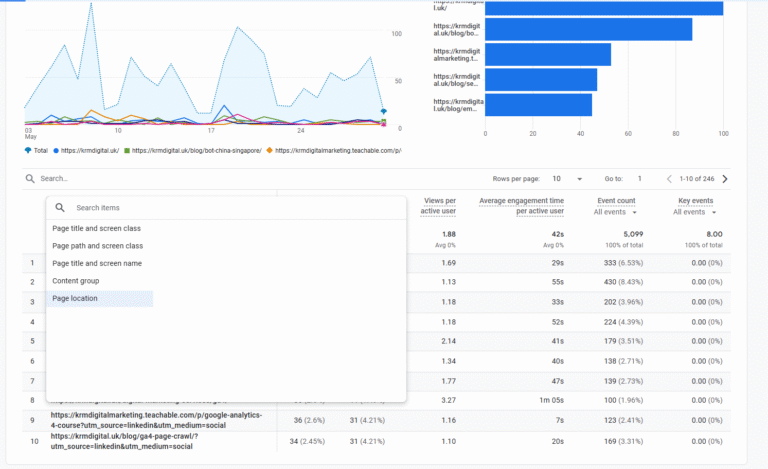
The dimension here that shows the full URL is called “Page Location.”
This dimension is the complete URL of the webpage that someone visited on your website.
It would include the domain and any UTMs used.
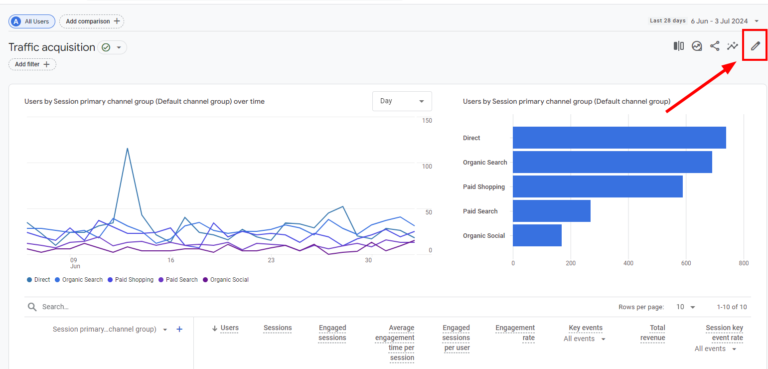
If you want a permanent, quick view of your full URLs, subdomains, and UTMs, you need to tweak your standard reports.
Here is the exact step-by-step process.
Finally, click Save, and then ‘Save changes to current report’.
You have 2 options here as well. You can set ‘page location’ as the default dimension. So that’s the first dimension you always see.
Alternatively, if you don’t set is a default, it’s available in the dropdown.
It saves clients the hassle of constantly switching views to understand their own subdomain data. You can do this by clicking the three dots next to Page Location in the customisation menu and hitting ‘Set as default’.
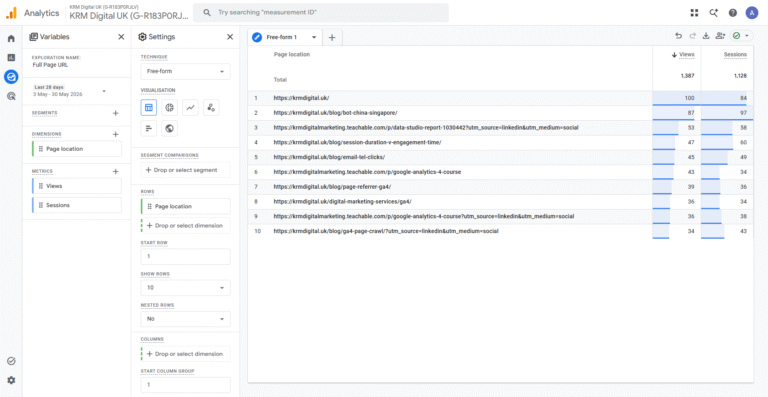
If you are running deeper analysis on specific subdomains or campaign URLs, you will want to use Explorations.
This will be in the form of a free form report.
Within the free-form report, you could apply extra filters to hone down on what you want.
All of this is possible within the free-form section, just remember to add the dimension in the Variables section and add it as a filter in the Settings section.
Getting your data clean and readable across all your subdomains is the first step to making actual improvements.
While it would be brilliant if Google made Page Location the default, a few minutes of customisation is a small price to pay for accurate data and easier UTM reviewing.
How do I separate subdomain traffic in GA4?
By replacing the default ‘Page Path’ dimension with ‘Page Location’. This displays the entire URL, including the specific subdomain (for example, https://blog.yoursite.co.uk/post), allowing you to segment traffic accurately.
Can I view UTM parameters on landing pages in GA4?
Yes. By adding the ‘Page Location’ dimension to your reports or Explorations, you can view the full absolute URL. This includes the query strings appended to the end of your links, making it easy to review your campaign tracking.
Why is my Page Location report not showing revenue in GA4?
The Page Location dimension is currently incompatible with the Total Revenue metric in standard reports. You must remove Total Revenue from the metrics list to apply the Page Location dimension successfully.
Does tracking UTMs cause high cardinality in GA4 explorations?
It certainly can. Because ‘Page Location’ captures full query strings, every unique UTM combination creates a new row. If you have thousands of unique variations, GA4 might group the lower-traffic URLs into a single row called ‘(other)’ to handle the massive volume of data efficiently.

Learn how to implement the Meta Pixel in Google Tag Manager using the Stape template.

Learn the four distinct types of GA4 events and how to set them up

Use the event settings variable in Google Tag Manager to speed up your event build and reduce errors.

Is GA4 on all your pages? Find out how to crawl your site and review if your missing out on data.
Author
Hello, I'm Kyle Rushton McGregor!
I’m an experienced GA4 Specialist with a demonstrated history of working with Google Tag Manager and Looker Studio. I’m an international speaker who has trained 1000s of people on all things analytics.