
5 Underrated Features in GA4

February 25, 2026

Are you tired of feeling like you are wrestling with the Google Analytics 4 interface?

You are certainly not alone.

Many marketing managers and digital agency teams struggle to locate the exact data they need quickly.

GA4 has a reputation for being slightly clunky (which I don’t believe fyi), but there are some seriously powerful tools tucked away beneath the surface.

Once you know where to look, you can gather the exact information you need at the click of a button.

We are going to look at five underrated features that will add immediate value to your tracking setup and support your daily client communication.

Table of Contents

Key Takeaways

  • Annotations provide vital context for traffic spikes and drops.

  • Report customisation turns a frustrating interface into a streamlined dashboard.

  • Content groups allow you to assess the performance of specific website sections.

  • Custom insights act as an early warning system for critical tracking failures.

  • The funnel report helps shift your focus towards actual user conversions.

Feature No 1: Annotations

Data without context is often just noise.

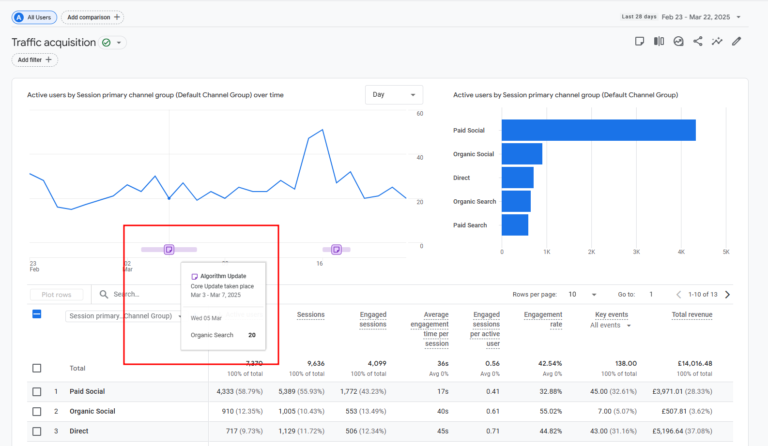
Annotations are a fantastic way to add necessary background information to those sudden peaks and troughs in your reporting.

You can use annotations to mark significant changes that impact your traffic.

This could include:

  • major search engine algorithm updates,
  • national events, or
  • specific changes you make to the website layout.

And much more.

In my own campaigns, I have seen that adding a simple note about a navigation update prevents hours of panicked reporting later.

Learn more about annotations here.

Report annotations in GA4

Feature No 2: Report Customisation

I hear time and time again that people struggle to find the information they need in GA4.

The standard setup can feel overwhelming.

However, you really only need to spend half an hour tweaking it to see a massive difference.

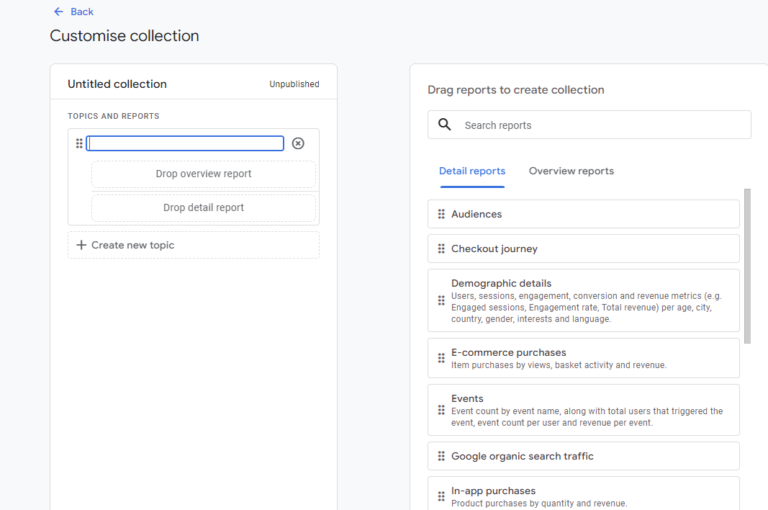
You can customise the interface completely. By hiding the metrics you never use and highlighting the ones you check daily, you will get the reports you need instantly.

This goes for dimensions too – you can create an SEO report filtered to Organic showing source / medium. Or even a specific Social Media report.

Learn more about customising reports in GA4.

Customise collection interface

Feature No 3: Content Groups

Content groups are incredibly helpful for breaking down large websites.

When you set up these groups, you can categorise your pages into logical buckets.

This is particularly great for e-commerce platforms or SaaS providers.

Instead of looking at hundreds of individual URLs, you get a helicopter view of performance.

You can clearly see which services or product categories are performing well compared to others. It is a brilliant way to segment your site and understand broader user behaviour.

Get bucketing pages into content groups today.

Content Group in Reports

Feature No 4: Custom Insights

Nothing ruins a Monday morning quite like realising your tracking broke three days ago.

Custom insights act as your automated early warning system.

If a developer accidentally removes your tracking tags, or your entire site experiences a critical server 500 error, you need to know immediately.

You can configure Custom Insights to find that information and alert you the moment a specific metric drops to zero. Industry data consistently shows that proactive monitoring saves agencies thousands of pounds in lost attribution.

Learn more about custom insights here.

Feature No 4: Funnel Report

Marketing teams often focus far too much on getting more people to the website.

While traffic is obviously important, understanding what those users do once they arrive is where the real value lies.

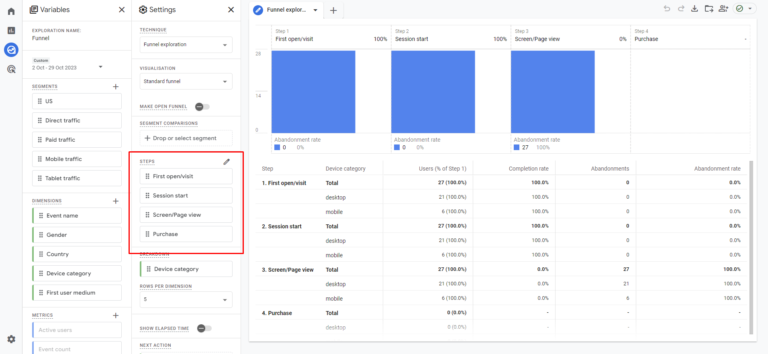
The funnel report helps you visualise the exact steps a user takes towards a conversion.

You can see precisely where potential buyers drop off.

This allows you to stop guessing and start fixing the specific pages that cause friction.

Steps-Funnel-Report

Wrapping Up

Getting the most out of your data does not require a degree in data science.

By setting aside a little time to implement annotations, configure your content groups, and set up custom insights, you will transform how you interact with your analytics.

You will spend less time searching for numbers and more time acting on them.

Ready to put these features into practice? Download our comprehensive GA4 Configuration Checklist to ensure your agency accounts are set up for absolute success.

Frequently Asked Questions

How do you add annotations in GA4?

You can use external browser extensions or specific GA4 API tools to overlay annotations directly onto your timeline charts, allowing you to mark algorithm updates or site changes.

Can you customise standard reports in GA4?

Yes. Anyone with the correct administrative permissions can click the pencil icon in the top right corner of most standard reports to add, remove, or rearrange dimensions and metrics.

What are content groups used for?

They allow you to logically categorise your website pages into distinct buckets. This helps you analyse the aggregate performance of entire blog sections, product categories, or service offerings.

Kyle

Author

Hello, I'm Kyle Rushton McGregor!

I’m an experienced GA4 Specialist with a demonstrated history of working with Google Tag Manager and Looker Studio. I’m an international speaker who has trained 1000s of people on all things analytics.

Scroll to Top