
Cohort Reports
Learn to use GA4 Cohort Explorations to track retention, spot trends, and refine your marketing strategy.
Finding and harnessing Google Analytics search terms will be so valuable.
Being able to understand what your users are searching for on your site helps to:
But like most things in GA4, it’s not always easy to find that information.
So we’ll take a look at:
This article is searches that users conduct on your site. This is different to the Search Console report which is about what users search on Google for your site to be visible.
Getting search term data into GA4 can be a relatively easy thing to do. Depending on your set-up.
Search terms are part of the enhanced measurements of GA4.
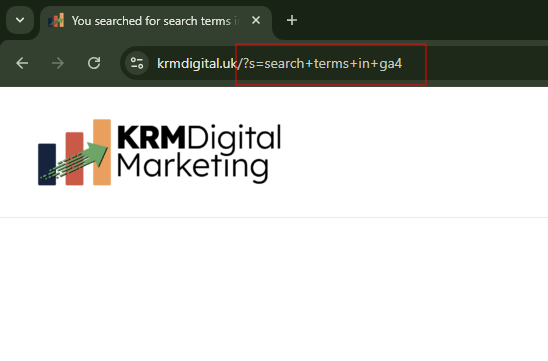
The event ‘view_search_results’ is sent to GA4 is any of the following are present in a URL query parameter:
If the ‘view_search_results’ event is sent to GA4, it comes with a parameter called search_term.
This then populates the dimension Search Term.
If you have URL query parameters post search that don’t meet the qualifications above, you can add these into GA4.
So if your search term query parameter is ?search_term or ?searches, then you’d need to add those into GA4.
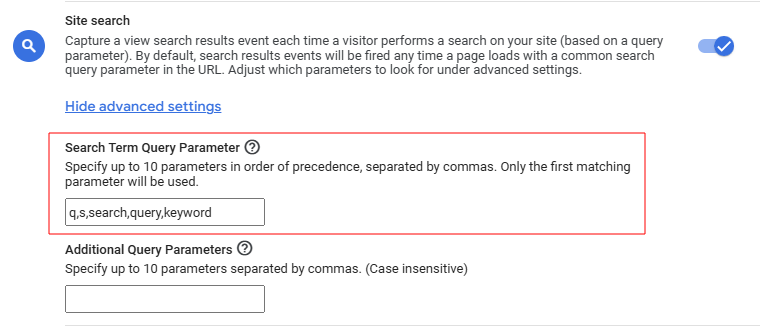
To do this, head to Admin > Data Collection and Modification and Data Streams.
From here, click on the settings cog next to Enhance Measurements. Find the site search enhanced measurement. Click on Show Advanced Settings.
You also have the optional to add additional parameters, if your search function provides the opportunity to add additional parameters e.g. gender, colour, type etc.
If you’re having a bad time with automatically configuring site search terms there are few options available to you:
Whatever approach you use in GTM, the result is the same, you’d send the event view_search_results with the parameter search_term.
If you’ve got the search results event set up, now comes the fun stuff – the review and analysis.
Now, here’s my starter for 10 – don’t even both with finding the data in the Report section of GA4.
It’s rubbish!
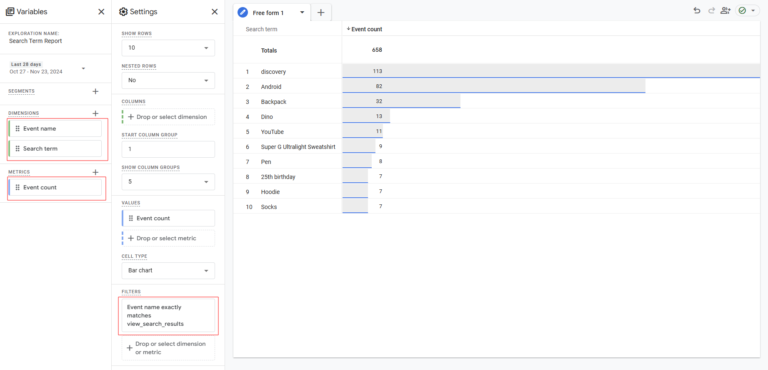
The best approach I would suggest is to configure this as an exploration.
Head to the Explore section of GA4 and click on Free Form.
Name the report something like ‘Search Term Report’
You’ll want to add in these dimensions to the report:
And include the metric:
This provides you with a list of terms that people are searching for on your website.
Huzzah!
Well, what do we do now with that information?
If there are any search terms you feel shouldn’t be there – because the relevant pages should be easily found. Then there’s a UX issue. Perhaps the mega menu isn’t appropriately configured.
Perhaps the search terms are uncovering terms that exist because you don’t have the relevant content yet.
Users might be searching for solutions or content that doesn’t exist yet. Therefore, right there, are content opportunities.
You might find that there are particular search terms that occur on a seasonal opportunity. Or are trending upwards.
This doesn’t necessarily require new content. But it might mean that you illuminate the content on your site (maybe with a banner). Or perhaps it’s the content you talk about on social media or emails.
So there we go – getting GA4 search terms is hopefully a simple process. And once you do, it could be a fountain of information to help your users. Brilliant.

Learn to use GA4 Cohort Explorations to track retention, spot trends, and refine your marketing strategy.

Learn to use the GA4 Segment Overlap report to isolate complex user groups and build better retargeting lists
Author
Hello, I'm Kyle Rushton McGregor!
I empower digital marketers and organisations master their data better to drive actions that make a difference through expert GA4 training, audits and insights